

VigorSwitch P2100
DrayTek VigorSwitch P2100 is a compact Layer 2+ Managed Gigabit PoE switch well-suited for smart home and branch/remote sites. It has 2x GbE SFP ports, 8x Gigabit Ethernet PoE/PoE+ ports with power budget of 140 watts, and 1x console port. Featuring Layer 3 features, including DHCP Server and VLAN Routing, VigorSwitch P2100 improves local network sustainability and efficiency regardless of the gateway. Furthermore with IP Conflict Detection & Prevention, ONVIF Surveillance, ping watchdog and a lot more, this is the balanced switch that brings advanced features into small environments.
Overview
DrayTek VigorSwitch P2100 is a compact Layer 2+ Managed Gigabit PoE switch well-suited for smart home and branch/remote sites. It has 2x GbE SFP ports, 8x Gigabit Ethernet PoE/PoE+ ports with a power budget of 140 watts, and 1x console port. Featuring Layer 3 features, including DHCP Server and VLAN Routing, VigorSwitch P2100 improves local network sustainability and efficiency regardless of the gateway. Furthermore, with IP Conflict Detection & Prevention, ONVIF Surveillance, ping watchdog, and a lot more, this is the balanced switch that brings advanced features into small environments.
8x PoE GbE PoE/PoE+ Gigabit Ethernet Ports
2x SFP Gigabit SFP slot
140 watts PoE Power Budget
20 Gbps switching Capacity
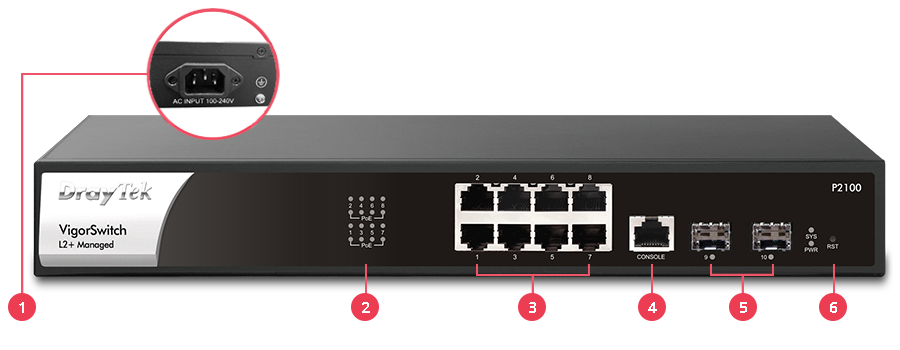
(1) Power Socket
(2) LED Indicator
(3) 8x PoE/PoE+ Gigabit Ethernet
(4) Console Port
(5) 2x SFP Port
(6) Reset Button
Key Features

PoE (Power over Ethernet)
Deliver power and data over one Ethernet cable, turn on/off the PoE device periodically with PoE Schedule.

QoS (Quality of Service)
Improve the performance of critical traffic by prioritizing the traffic with CoS, DSCP, and IP Precedence tag.

Ping Device Check
Enable Ping check to selected devices to keep monitoring on their status. If ping timeout, power cycle (if PoE enabled) the port and/or send out mail alert.

IPv6 Ready
VigorSwitch P2100 supports IPv6 by offering MLD Snooping, IPv6 ACL, and IPv6 DNS Resolver.

Auto Surveillance & Voice VLAN
Recognize traffic from IP cameras and IP phones automatically and add a CoS tag for QoS prioritization.

Web-Based GUI
Easily manage and monitor the network through the web-based console with graphics showing ports and hardware status. See demo

ONVIF-Friendly
Recognize the ONVIF devices, display surveillance topology, provide UI for video streaming and device maintenance. Learn more

Multiple Admin Accounts
Multiple Admin accounts with two levels of administrator privilege.

Wire-Speed VLAN Routing
Improve overall network performance by using VigorSwitch P2100 to route the inter-VLAN traffic directly and offload the router.

Central Switch Management
Set up VLANs easily from the router and get a centralized hierarchy view of the switches. Learn more

IP Conflict Prevention
Improve network stability by avoiding IP conflicts caused by a misconfigured or malicious host. Learn more

Energy-Efficient Ethernet
Compliant with IEEE 802.3az to reduce power consumption.

Access Control
VigorSwitch P2100 supports ACL by IP/MAC and 802.1x port access control with RADIUS to filter unauthorized hosts.

LLDP-MED
Automatically detects VoIP devices, simplifies VLAN assignment, and prioritizes voice traffic for smoother VoIP deployment.
ONVIF-Friendly
Recognize the ONVIF devices in different VLANs, display surveillance topology, provide UI for video streaming and device maintenance.
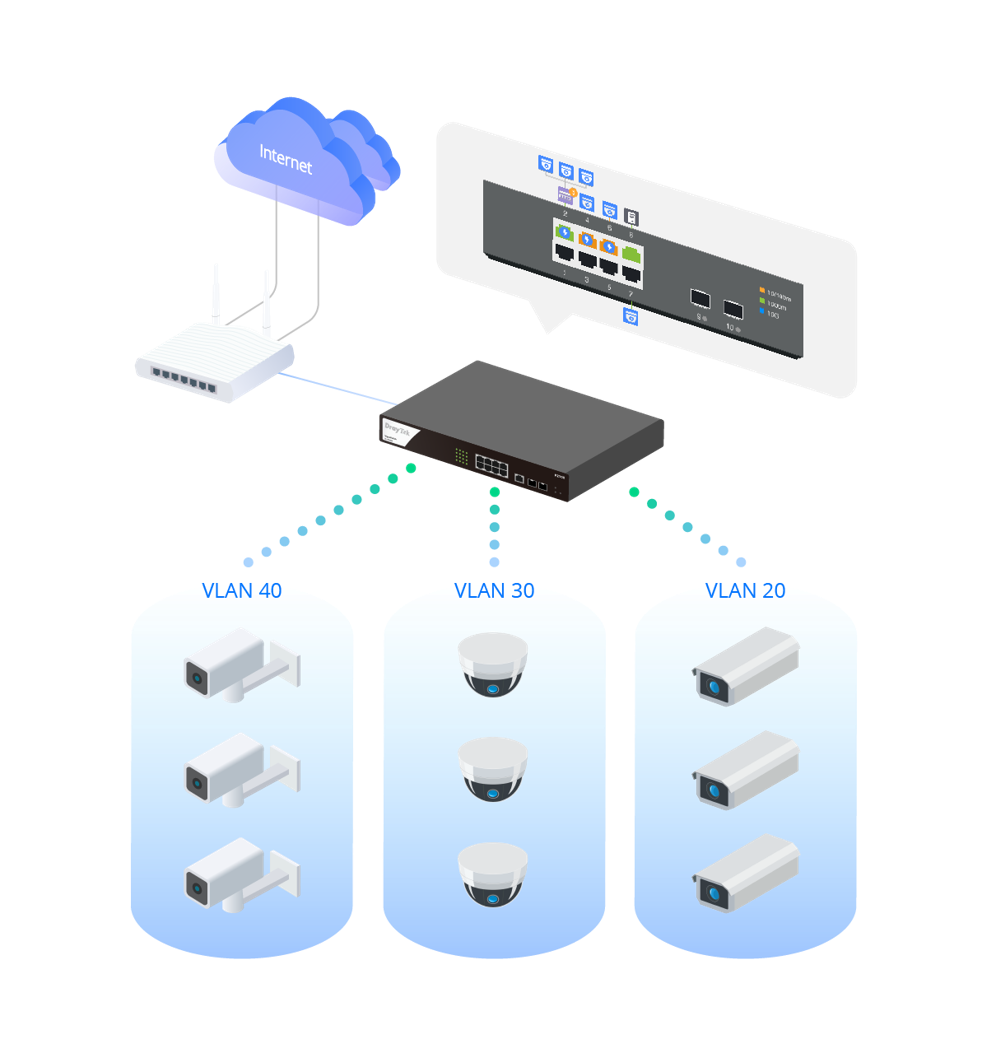
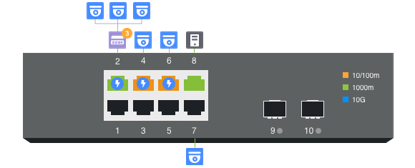
Centralized Hierarchical View
VigorSwitch automatically detects ONVIF devices, and displays the topology of connecting IP cameras and NVRs.
Images Viewing
Images filmed by IP cameras can be viewed directly on VigorSwitch.
Device Management
Support ONVIF devices basic configuration/maintenance remotely via VigorSwitch. Such as remote reboot, factory reset, network settings, etc.
ONVIF Snapshot Alert
Locating Not-Responding Cameras Made Easy

It’s already difficult to manage several IP cameras across different locations and customers, not to mention to keep monitoring on which camera stops functioning.
To help on this task, VigorSwitch keeps pinging on the ONVIF IP cameras and taking snapshots from them periodically, and sends out an email alert with the latest snapshot when a camera is not responding.
With PoE models, VigorSwitch can also provide first aid to automatically power cycle the particular port to reboot the camera.